Chapter 9 综合练习3(MCP)
如今的LLM能很好的理解文字,这意味着,我们可以把项目描述(XML)作为MCP工具暴露给它,如此一来,就可以用对话的方式(文字或者语音)完成海量的工作。
我们为StdUnit.Tags项目添加了一个StdUnit.Tags.McpServer扩展包。简单的说,它会把你的测点描述映射成一组MCP工具和资源,以给你的AI大脑安上观测设备的眼睛和操作设备的手。
仍以之前简单的心跳示例为例,这里我们会让AI自主读写心跳。开始之前,让我们先看一段示例视频:
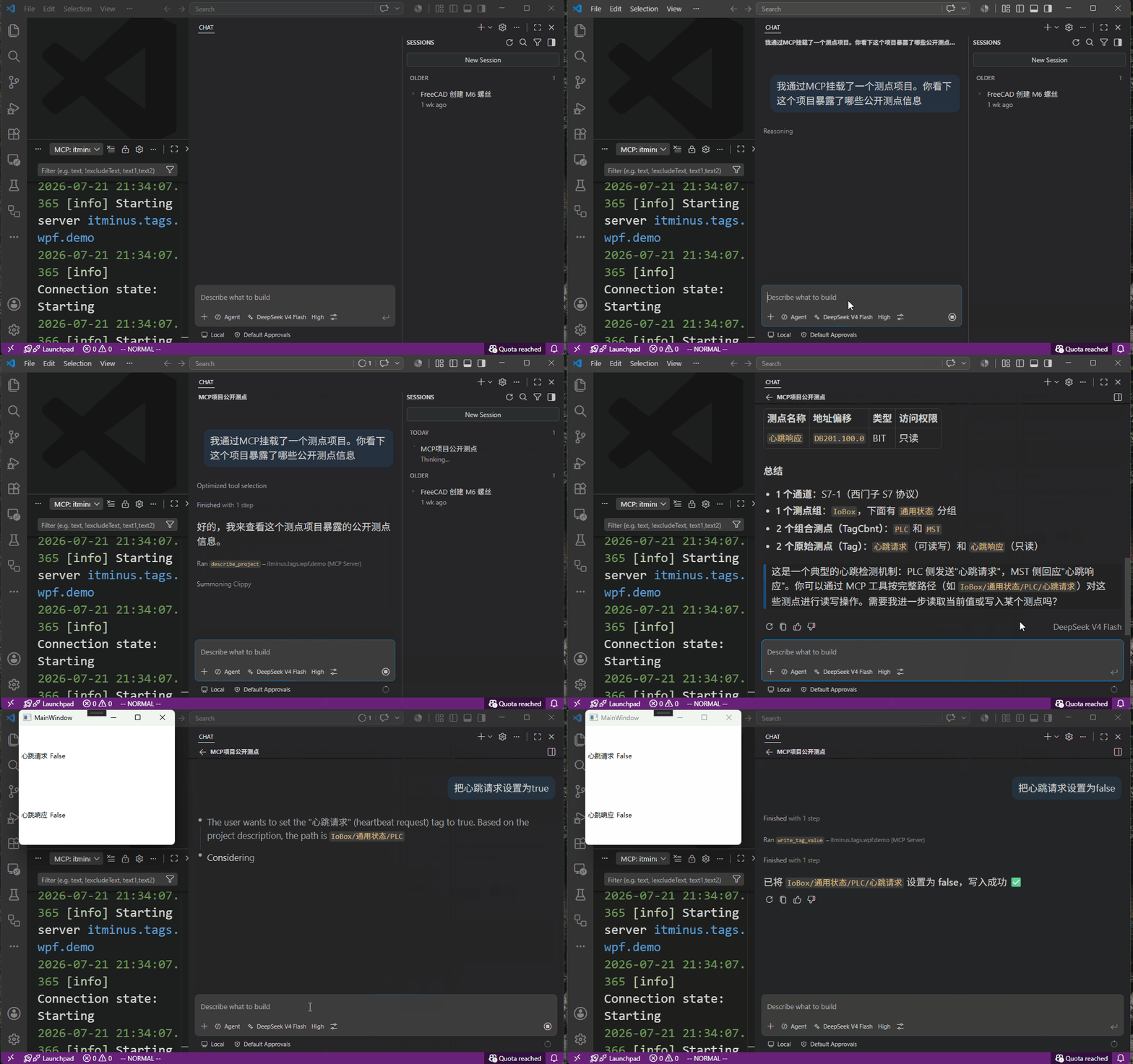
测点描述
为了能修改点位,我们需要把心跳请求 的访问方式从RO改成RW:
<Tag name="心跳请求" address="$$100.0" type="BIT" access="RW"></Tag>
环境配置
我们打算把MCP嵌入到我们之前的WPF程序中。我们需要添加包 StdUnit.Tags.McpServer。这个包负责把项目描述、点位读写作为MCP工具暴露出来。
最后,对于WPF项目,MCP stdio 肯定是不适合了,所以我们打算在WPF中嵌入一个Web,这意味我们还需要添加包依赖ModelContextProtocol.AspNetCore。
引入 MCP
然后像普通的Web项目那样,让我们建一个STARTUP.cs文件来配置依赖注入的服务和中间件:
public static class STARTUP
{
    public static void ConfigureServies(this IServiceCollection services)
    {
        services.AddLogging();
        services.AddSerilog((sp, lc) => lc
            .ReadFrom.Services(sp)
            .WriteTo.Console()
            .WriteTo.File("logs/log.txt", outputTemplate: "{Timestamp:yyyy-MM-dd HH:mm:ss} [{Level:u3}] [{SourceContext}] {Message}{NewLine}{Exception}", rollingInterval: RollingInterval.Day)
            .Enrich.FromLogContext()
        );
        services.AddWpfDemoTags();

        // 注册MCP Server  (使用HTTP通道)
        services.AddMcpServer()
            .WithHttpTransport(opts => {
                opts.Stateless = true;
            })
            // 注册 StdUnit.Tags MCP 服务
            .AddTagsMcp();
        services.AddAuthentication();
    }

    public static void ConfigureMiddlewares(this WebApplication app)
    {
        // 使用MCP中间件
        app.MapMcp("/mcp");
    }
}
在WPF的App.xaml.cs下,增加一个StartWeb方法:
    private static void StartWeb(WebApplication app)
    {
        app.ConfigureMiddlewares();
        var th2 = new Thread(() =>
        {
            app.Run("http://localhost:3001");
        });
        th2.IsBackground = true;
        th2.Start();
    }
最后在Application_Startup中启用配置并启动服务即可:
    private void Application_Startup(object sender, StartupEventArgs e)
    {
        var builder = WebApplication.CreateBuilder();
        builder.Services.ConfigureServies();
        var app = builder.Build();
        this.Root = app.Services;
        this.Ctrl = this.Root.GetRequiredService<ITagsProjectCtrl>();
        this.Ctrl.OnStartingException = ex =>
        {
            MessageBox.Show($"Tags处理启动异常:{ex.Message}", "错误", MessageBoxButton.OK, MessageBoxImage.Error);
            return Task.FromResult(true);
        };

        StartTagsPoll(this.Root, this.Ctrl);
        StartWeb(app);
    }
至此,你就可以把MCP Server丢给AI,让AI读写相关测点了(参见的上面的视频)。